If 10.0.0.1 opens on your PC but not on your phone, the problem is usually caused by your phone settings, not the Piso WiFi device. Mobile data, a private MAC address, or browser settings can stop the page from loading. This guide explains the most common causes and shows simple steps to fix the problem quickly.
📋 Contents
Quick Answer: Phones quietly switch to mobile data when WiFi is weak and use a random MAC address for privacy, and either can block the local page. Turn off mobile data, stay on the device WiFi, disable the private MAC for that network, and reload the local login page.
Why Only the Phone Fails
Your phone does extra things a desktop never bothers with, and any one of them can block 10.0.0.1. It switches to mobile data when WiFi looks weak, it hides behind a random hardware address for privacy, and its browser adds search suggestions or HTTPS by default. Each habit is harmless online but trips up a local gateway page.
Turn Off Mobile Data First
Mobile data is the single most common reason a phone fails where a PC succeeds. When the WiFi signal dips, the phone silently routes your request over cellular, which can never reach the local 10.0.0.1 page. Switching mobile data off forces the phone to stay on the Piso WiFi network, and the panel usually loads at once.
With data off, the phone uses WiFi only and reaches the 10.0.0.1 admin login page.
Is a Private MAC Blocking You?
In 2026, modern Android and iOS phones use a random MAC address by default for privacy. Some Piso WiFi machines tie your session to that hardware address, so a randomised one looks like a stranger and gets blocked. Switching it back to your real device address for this one network fixes the page on most phones.
Phone Browser Tricks That Work
Phone browsers are eager to help, and that is the problem. They upgrade plain addresses to HTTPS, turn a typed IP into a search, and hold onto old cached redirects far too long. A few small habits keep the browser out of the way so the local page can load cleanly on your phone.
How Do You Forget and Rejoin WiFi?
When the page still will not load, a stuck or stale WiFi connection is often to blame. Forgetting the network and joining it again forces your phone to pull a fresh address from the Piso WiFi machine, which clears most lingering connection faults. It takes under a minute and needs no settings beyond the WiFi menu.
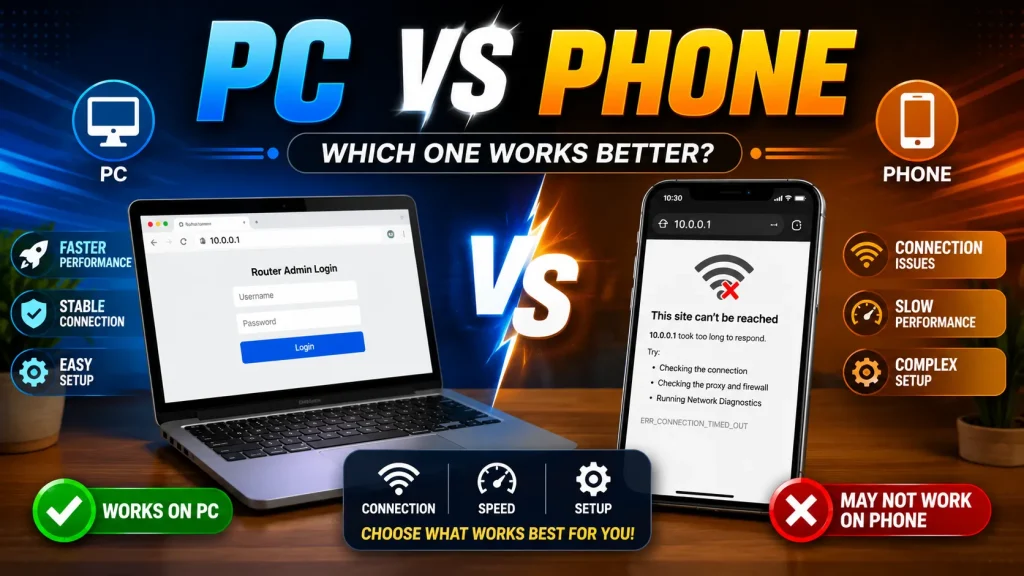
PC vs Phone Checklist
Most phone-only failures come down to four settings a PC handles differently. Run this quick checklist before you assume the machine is broken. If all four rows pass and the page still will not open, the fault has moved off your phone and onto the network or the device itself.
| Check | Phone |
|---|---|
| Mobile data off | Must be off |
| Private MAC | Turn off if blocked |
| http not https | Type it fully |
| On device WiFi | Required |
Still nothing? Work through the can’t access 10.0.0.1 checklist or the wider Piso WiFi login problems guide.
Frequently Asked Questions
Why does 10.0.0.1 work on PC but not my phone?
Phones switch to mobile data and use a random MAC address. Both can block 10.0.0.1, while PCs usually do not.
How do I open 10.0.0.1 on my phone?
Turn off mobile data, stay on the device WiFi, and type http://10.0.0.1 in a private tab.
What is a private WiFi address?
It is a random MAC your phone uses for privacy. On some Piso WiFi machines it blocks the page, so switch it off for that network.
Should I forget and rejoin the WiFi?
Yes, if the page still fails. Forgetting the network and joining again clears a stuck connection on the phone.
Is mobile data really the problem?
Often, yes. When WiFi is weak, the phone quietly uses mobile data, which cannot reach the local admin page.
Conclusion
If 10.0.0.1 works on your PC but not your phone, the problem is usually a phone setting rather than the Piso WiFi device. Turn off mobile data, stay connected to the correct WiFi network, use http://10.0.0.1, and check your private MAC setting. If needed, forget and reconnect to the network. These simple steps fix most phone access problems quickly and help you reach the admin page without trouble.